- Jul 19
Anyone Can Write PLC Logic. Few Can Structure It
- plc tutorials
- 0 comments
If you've been working with PLCs for a while, you've probably experienced this situation. A production line stops unexpectedly, maintenance calls for support, and you connect your laptop to the controller expecting to identify the problem quickly. Instead, you open the PLC project and are greeted by hundreds of ladder rungs packed into a single routine. Branches stretch across the screen, timers are reused for multiple functions, internal memory bits have names that mean nothing, and there are almost no comments explaining the programmer's intentions. The machine may have worked perfectly yesterday, but understanding the software today feels like solving a puzzle.
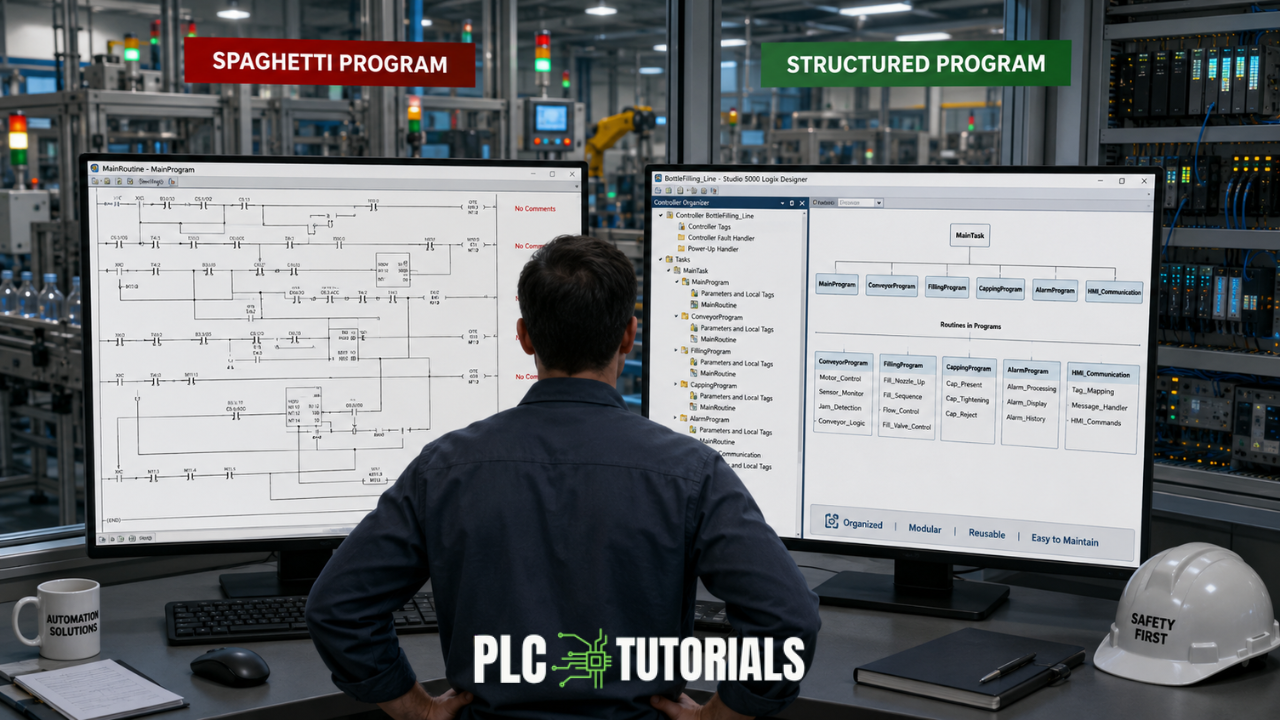
Interestingly, this isn't usually because the original programmer lacked technical knowledge. More often, the project simply evolved without a proper structure. Small modifications were added over months or years, temporary fixes became permanent, and the application slowly transformed into something that nobody fully understood. This style of programming is commonly known as spaghetti programming, and almost every automation engineer encounters it at some point in their career.
The good news is that there is a better approach. Structured programming allows you to build PLC applications that are easier to understand, troubleshoot, modify, and expand. Regardless of whether you use Allen-Bradley Studio 5000, Siemens TIA Portal, or another PLC platform, the principles remain the same. A well-structured project saves engineering time throughout the entire life of the machine.
Understanding Spaghetti Programming
The term spaghetti programming originated in software development and describes code whose execution path resembles a tangled plate of spaghetti. In PLC programming, the idea is very similar. The logic may still function correctly, but it lacks organization. Every new machine feature is squeezed into existing routines, duplicate logic appears throughout the project, and troubleshooting becomes increasingly difficult.
One of the biggest misconceptions is that spaghetti programs are written intentionally. In reality, most begin as simple, well-organized projects. During commissioning, the customer requests another sensor. A few weeks later, production asks for an additional operating mode. Maintenance needs a bypass function, and another engineer later integrates a barcode scanner. Each change seems minor, so the quickest solution is simply to add a few more ladder rungs.
After several years, the project contains hundreds of small modifications. None of them seem problematic individually, but together they create software that is difficult to understand. The machine still runs, yet even experienced engineers hesitate before making changes because they are unsure what else the modification might affect.
This is why experienced programmers often say that software ages differently than hardware. A conveyor motor may operate reliably for fifteen years with routine maintenance, while the PLC program controlling it can become increasingly complicated every time someone edits it.
The Real Cost of Poor Program Structure
Many engineers judge a PLC program by one simple question: "Does it work?" If the answer is yes, they assume the software is good. Unfortunately, that isn't how software quality is measured.
The true test of a PLC application comes months or years after commissioning. Imagine you leave your company today and another engineer inherits your project. Will they understand how the machine operates? Can they locate the motor logic within minutes? Will they feel confident adding another production station?
If the answer is no, the software has already become a liability.
Poorly structured programs increase troubleshooting time because engineers spend more effort locating the correct logic than solving the actual fault. Maintenance technicians often describe situations where identifying a broken sensor takes five minutes, while understanding the PLC program consumes an entire hour.
Production downtime is expensive. Every additional minute spent searching through confusing ladder logic delays the return to operation. For manufacturers running high-speed packaging lines, food processing plants, or automotive production systems, that delay quickly translates into lost revenue.
Good program structure doesn't make the PLC execute faster. It makes engineers work faster.
What Structured Programming Really Means
Structured programming is much more than writing neat ladder logic or adding comments. It is a method of organizing software so that every section of the application has a clearly defined responsibility.
Think about a bottle filling machine. The conveyor transports bottles. The filling station dispenses liquid. The capper seals the bottles. The reject mechanism removes faulty products. Each piece of equipment performs a different task, yet they work together as one complete machine.
Your PLC software should reflect exactly the same organization.
Instead of placing all machine logic inside one large routine, each functional area should have its own section. Conveyor control should be separated from filling logic. Alarm handling should be independent of recipe management. Communication with HMIs or SCADA systems should have its own dedicated routines. When the software mirrors the physical machine, navigation becomes intuitive. Engineers immediately know where to begin troubleshooting because every routine has a clear purpose.
This philosophy also encourages code reuse. Rather than copying motor logic twenty times throughout the project, you develop one standardized solution and reuse it consistently. Future modifications become much simpler because improvements only need to be implemented once.
Structured Programming in Allen-Bradley Studio 5000

Rockwell Automation designed Studio 5000 around a hierarchical architecture that naturally supports structured programming. The project begins with a controller that contains one or more Tasks. Tasks determine when logic executes. A continuous task runs repeatedly, while periodic tasks execute at fixed intervals such as every 10 milliseconds. Event tasks respond only when specific hardware or software events occur.
Inside each task are one or more Programs. Rather than creating a single program for the entire machine, experienced engineers divide the application into logical areas. A packaging line might contain separate programs for conveyor control, filling, capping, alarms, diagnostics, recipe handling, and communication.
Each program then contains multiple Routines. The Main Routine acts as the entry point and calls other routines using JSR instructions. Instead of placing hundreds of ladder rungs inside one routine, each routine focuses on a single function. One routine might start and stop conveyors, another manages photoelectric sensors, while another controls pneumatic cylinders.
Studio 5000 also provides User-Defined Data Types (UDTs) and Add-On Instructions (AOIs). These features allow engineers to create reusable software components. If a machine contains thirty identical motors, each motor can use the same AOI rather than repeating identical ladder logic. This not only reduces programming effort but also ensures every motor behaves consistently throughout the application.
When projects become large, this structure makes navigation remarkably simple. Engineers can move directly to the program responsible for the affected equipment without searching through unrelated code.
Structured Programming in Siemens TIA Portal

Although Siemens uses different terminology, the underlying philosophy is remarkably similar.
Instead of Tasks and Programs, TIA Portal organizes software around Organization Blocks (OBs), Functions (FCs), Function Blocks (FBs), and Data Blocks (DBs).
The PLC normally begins execution inside OB1, which acts as the main cyclic program. Rather than placing all machine logic directly inside OB1, engineers call additional FCs and FBs responsible for individual machine sections.
Functions are generally used for calculations or operations that do not require memory. Scaling analog values, mathematical calculations, and unit conversions are typical examples.
Function Blocks, however, retain internal memory through Instance Data Blocks. They are ideal for reusable machine components such as motors, valves, conveyors, or PID controllers. Each instance behaves independently while sharing the same software design.
Global Data Blocks store information that must be shared throughout the application, including recipes, production counts, machine settings, and alarm data.
This architecture encourages engineers to think in terms of reusable modules rather than isolated ladder rungs. As machines grow larger, this modular approach significantly improves maintainability.
How Should Beginners Learn PLC Programming?
Many newcomers believe PLC programming is about memorizing instructions. They spend weeks learning XIC, XIO, TON, TOF, MOV, CPT, and compare instructions. While these fundamentals are important, they represent only one part of becoming an automation engineer.
Professional PLC programmers think beyond individual instructions. They learn how to organize projects, develop reusable software, document their work, and design applications that remain understandable years after commissioning.
One of the best ways to improve is by studying complete industrial projects rather than isolated examples. Opening a finished PLC application teaches you how experienced engineers divide logic into routines, organize tags, build reusable modules, and handle alarms, communication, analog signals, and machine sequences. Every project becomes an opportunity to understand software architecture, not just ladder logic.
The more complete projects you study, the faster your programming skills develop.
Learn from Real Industrial Projects
When I first started learning PLC programming, I found plenty of books explaining individual instructions. They described timers, counters, mathematical functions, and comparison instructions in detail. However, very few explained how those instructions come together to build an actual machine.
That experience inspired me to write Everything About PLC Programming.

Everything about PLC programming
Rather than focusing only on instruction references, the book explains how professional PLC applications are designed using real industrial examples. You'll learn how experienced automation engineers organize projects, implement structured programming techniques, troubleshoot efficiently, and build maintainable software that follows industry best practices.
Play
The July 2026 Edition has been completely updated with new content, improved explanations, and additional real-world examples. More importantly, it includes downloadable Studio 5000, TIA Portal, and GX Works3 project files, allowing you to explore complete PLC applications on your own computer. Instead of simply reading ladder diagrams in a book, you can open real projects, follow the execution sequence, examine tag structures, and understand how modern automation software is organized.
Learning from complete applications is one of the fastest ways to bridge the gap between theory and practical engineering.
Final Thoughts
The difference between an average PLC programmer and an exceptional one is rarely the number of instructions they know. More often, it is the way they organize their software.
Spaghetti programming may keep a machine running today, but structured programming keeps it maintainable for years to come. Clean architecture shortens troubleshooting time, reduces production downtime, simplifies future upgrades, and allows multiple engineers to collaborate confidently on the same project.
Whether you program in Allen-Bradley Studio 5000, Siemens TIA Portal, Mitsubishi GX Works3, or any other IEC 61131-3 platform, the principle remains unchanged: write software that another engineer can understand without needing you beside them.
Machines eventually wear out, sensors need replacing, and production requirements continue to evolve. A well-structured PLC program makes those inevitable changes easier to manage. In the end, good PLC programming isn't just about making a machine work—it's about making it easy to support, improve, and trust for years to come.
Avinash Malekar
plc tutorials